To move an image, please do the following:
- Select the Select Annotation command or the Image Annotation command, put the cursor over the image and the cursor changes into an arrow
 .
. - Click and drag the image to another place you like.
To resize an image, please do the following:
- Select the Select Annotation command or the Image Annotation command, put the cursor over the image and the cursor turns into an arrow , and then click the image.
- Place the cursor on any corner point. The cursor changes into the cursor showing the direction at which the rectangle will be resized.
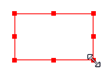
To resize the image
- Drag the cursor outside, it will increase the size of the rectangle proportionally. Drag the cursor inside and it will decrease the size of the rectangle proportionally.