Open the VBA Editor (i.e., the “Microsoft Visual Basic for Applications” dialog box) in Excel first. There are three methods to open the VBA Editor:
- Press shortcuts Alt+F11.
- Click Visual Basic in the Developer tab.

- Right-click a sheet and choose View Code in the context menu.
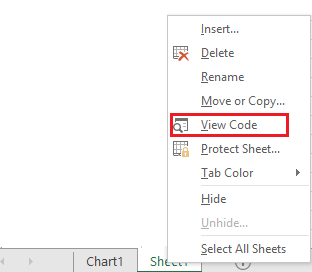
The VBA Editor pops up to continue.
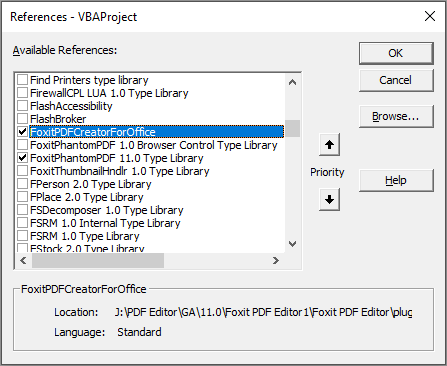
Click Tools > References, and check FoxitPDFCreatorForOffice and FoxitPhantomPDF 11.0 Type Library in the pop-up dialog box shown as the screenshot below. Click OK to exit the dialog box.
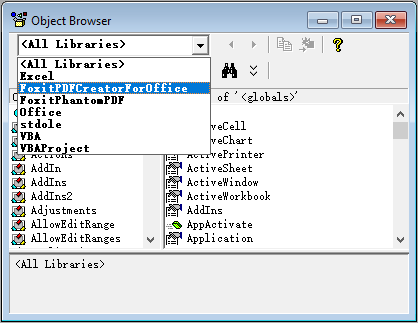
Click View > Object Browser in the VBA Editor. In the pop-up dialog box, click the <All Libraries> box and you can see FoxitPDFCreatorForOffice and FoxitPhantomPDF have been successfully referenced.
Now we’ve completed all necessary preparation and settings. For the API reference to communicate with Foxit PDF Editor (including Foxit PDF Editor’s add-in in Microsoft Office), please refer to API Reference for Application Communication