If a document contains potentially risky JavaScript, a dialog box will appear when you attempt to open it in Foxit PDF Editor:
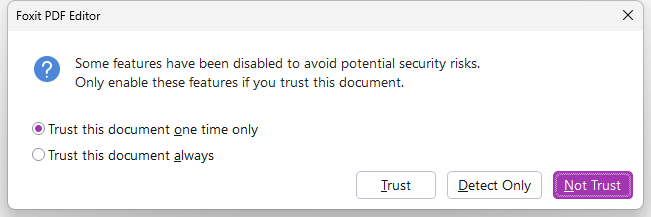
If you are unsure whether the document is safe, click Not Trust to stop opening the document, or click Detect Only to analyze it with the PDF Action Inspector tool. Choosing Detect Only allows the document to open in Foxit PDF Editor, but any JavaScript actions will be blocked. You can review the analysis results and decide whether to access the document.
If you trust the document, you can select an option to trust the document one time only or always trust the document and then click Trust to open it. SelectingTrust this document always in the dialog box also adds the document to privileged locations, and the dialog box will not prompt next time you open it in Foxit PDF Editor.