In a PDF, information can be stored on different layers. To show or hide related content stored in a variable number of separate layers, you can simply refer to the Layers panel on the left side of the work area. You can view layers and choose to show or hide the content associated with each layer.
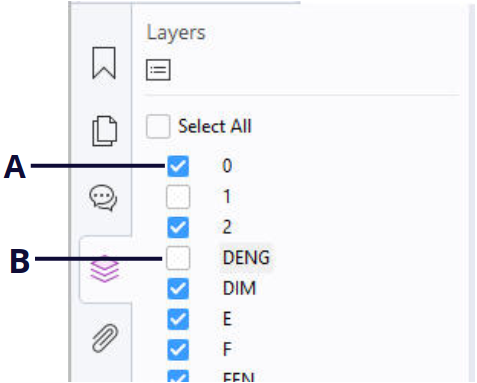
The Layers Panel (Subscription Release)
A. A checkmark indicates a displayed layer B. Hidden layer
1. Open the Layers panel, and then do one of the following:
- To hide a layer, uncheck the layer.
- To show a hidden layer, click the empty box and a checkmark will appear.
- To show or hide all layers, check or uncheck Select All directly.
- To check the properties of a layer, right-click the layer and select Properties.
2. From the Options menu at the top right corner of the Layers panel, choose one of the following:
- List Layers for All Pages – Shows every layer across every page of the document.
- List Layers for Visible Pages – Shows layers only on the visible pages.
- Reset to Initial Visibility – Resets layers to their default state.
- Expand All – Expands all layers.
- Collapse All – Collapses all of the current layers in the view.
- Apply Print Overrides – Determines whether to display a layer according to its corresponding Print setting in the Layer Properties dialog box. The option is available when Never Prints or Always Print is selected.
- Apply Export Overrides – Determines whether to display a layer according to its corresponding Export setting in the Layer Properties dialog box. The option is available when Never Exports or Always Exports is selected.
- Apply Layer Overrides – Displays all layers in the document regardless of the settings in the Layer Properties dialog box, and you cannot change layer visibility until you deselect this command or choose Reset To Initial Visibility in the Options menu. However, you are still allowed to rename layers when the command is selected.