You can also set the printing permissions by specifying certain network printers to protect the sensitive information from being printed arbitrarily.
Network Printers Configuration
To avoid unauthorized printing of sensitive documents, you can limit the printing permissions to certain network printers. To configure network printers, please refer to Web Service Configuration to configure the web service and SQL first, and then click the Valid Network Printer Setting tool in the “Foxit Configuration Tool” window and click the button  to enable this tool.
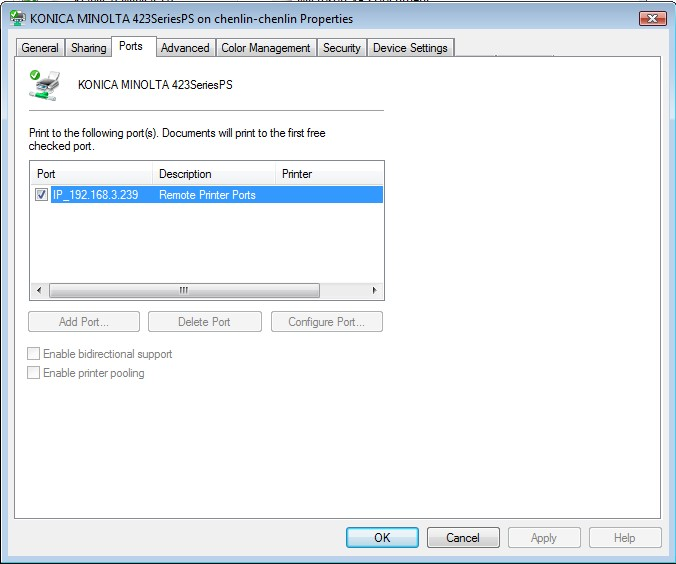
1. You should get the Printer Port first. Please go to Start > Devices and Printers > right-click a network printer > Printer Properties. In the printer properties dialog box, choose Ports tab and get the information, e.g. the “IP_192.168.3.239” is the printer port.
2. Click Add button in the “Foxit Configuration Tool” dialog box to add the Printer Port. You can also remove a printer port by choosing it and clicking Remove.
Note: About how to add a network printer, please see “Add a Network Printer”.
Add a Network Printer
There are two devices to add a network printer as below:
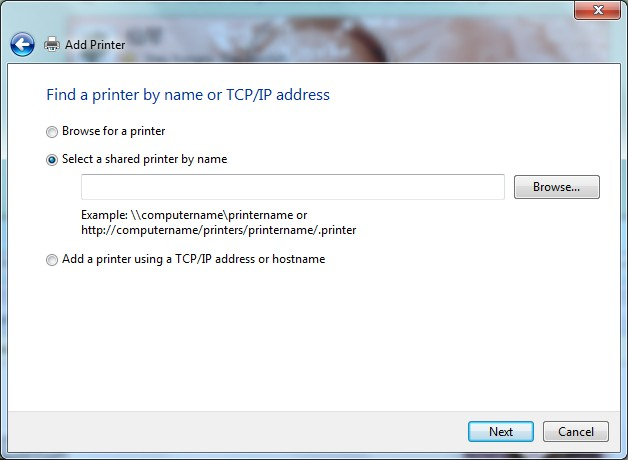
Go to Start > Devices and Printers > Click Add a printer. In the Add Printer dialog box, click The printer that I want isn’t listed to go to the next step.
Follow the instructions shown in the Add Printer dialog box as below and complete adding a printer.
- Open the Run box by pressing shortcut keys Win + R, enter the printer URL you want to add and click OK.
- In the pop-up dialog box, right-click the printer and choose Connect on the context menu.